
Saving login credentials automatically
mypassword.care can automatically detect when you're logging in or registering on a website and prompt you to save your credentials.
How it works (Browser Extension):
-
Go to a login or registration webpage in your browser.
-
Enter your username and password as usual.
-
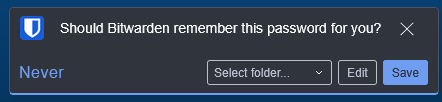
After clicking Log In or Sign Up, a popup from mypassword.care will appear asking if you'd like to save the credentials.
-
Click Save to store the login in your vault.
-
Click Never for this site if you don’t want to be prompted again.
-
If you don’t see the prompt:
-
Make sure the Bitwarden extension is installed and enabled in your browser.
-
Confirm that you're on a standard login form (some websites use custom login flows that may not trigger the prompt).
-
You can always save the login manually if needed.