
Saving login credentials manually
You can manually add a new login to your vault at any time. This is useful for accounts that don't prompt an automatic save, or when you want to pre-fill credentials before visiting a site.
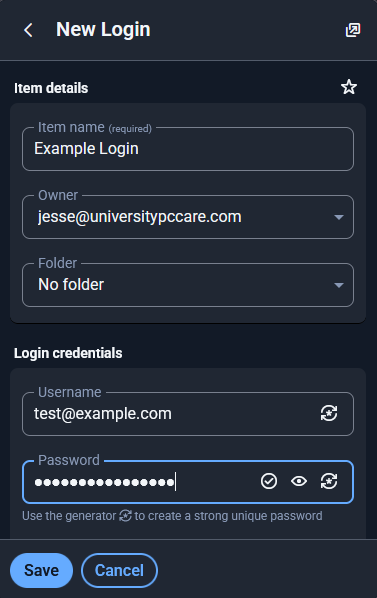
To manually add a login:
-
Open the mypassword.care app or browser extension.
-
Click on the "+" (Add Login) button.
-
Website URL – Enter the login page address (e.g.,
https://example.com/login) -
Username or Email – The identifier you use to log in.
Enter the following details:
-
Password – The corresponding password for the account.
-
-
Click Save.
📸Screenshot suggestion: Show the "Add Login" screen with example data filled out.
Once saved, the login will be available for auto-fill the next time you visit the website listed in the Website URL field.